persoo · Staff planning
Whether it’s an event, bar, festival or trade fair: with persoo you post your demand, suitable staff apply for the open shifts themselves — and you pick who fits best. No more WhatsApp groups, phone chains and Excel lists.
New Check-in and check-out via QR code, NFC or app →First 50 confirmed slots free · then €0.25 per confirmed slot · no base fee
Why persoo?
Who’s available when? Who does what? And who has just cancelled? Without a tool, this runs through chats, calls and spreadsheets. With persoo, your staff keep their own details up to date, get the invitation automatically and accept or decline with one click.
Two sides, one plan
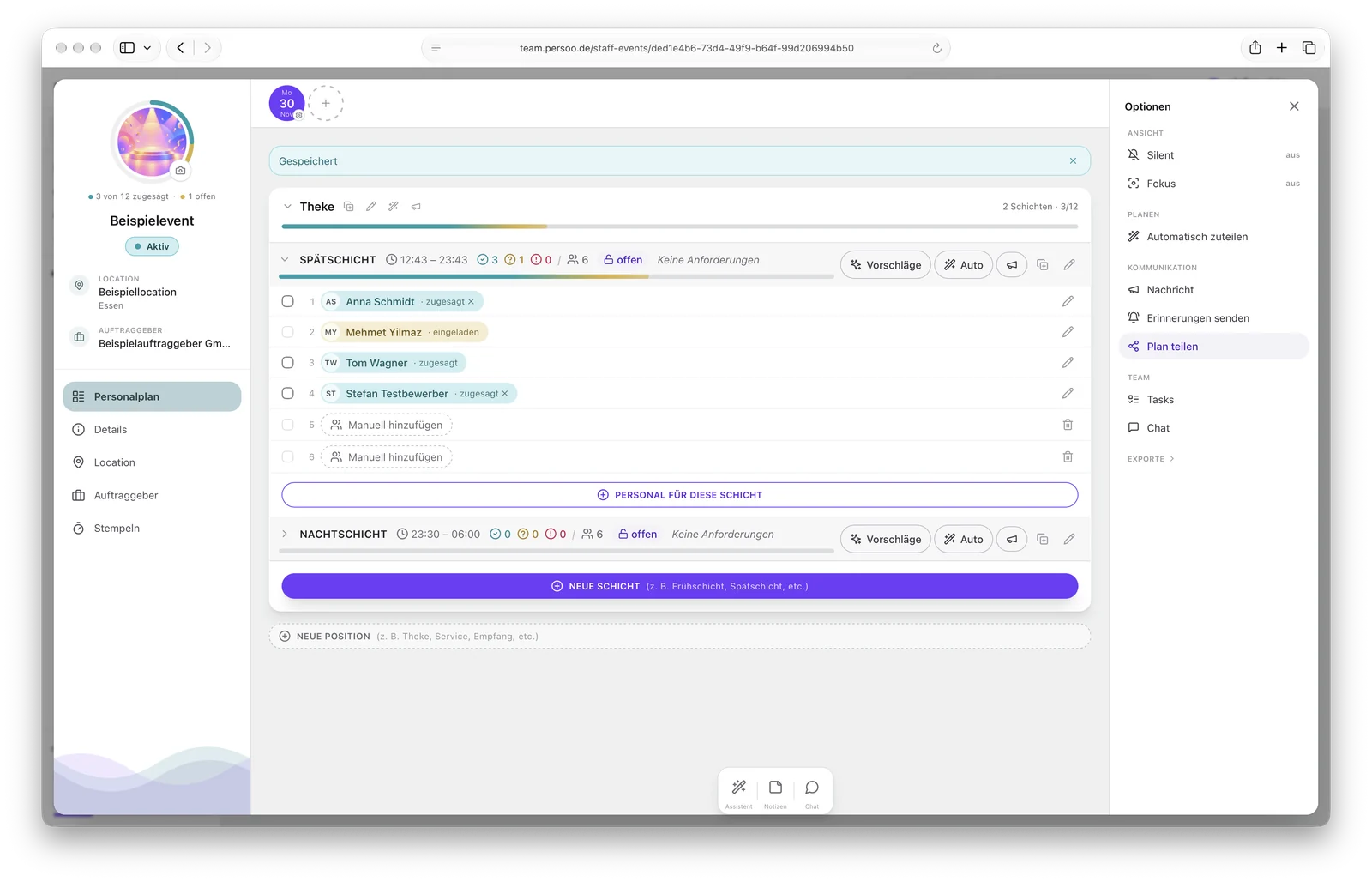
Whatever you enter on the planning board goes straight to your staff: as an invitation, in their calendar and in their own overview.
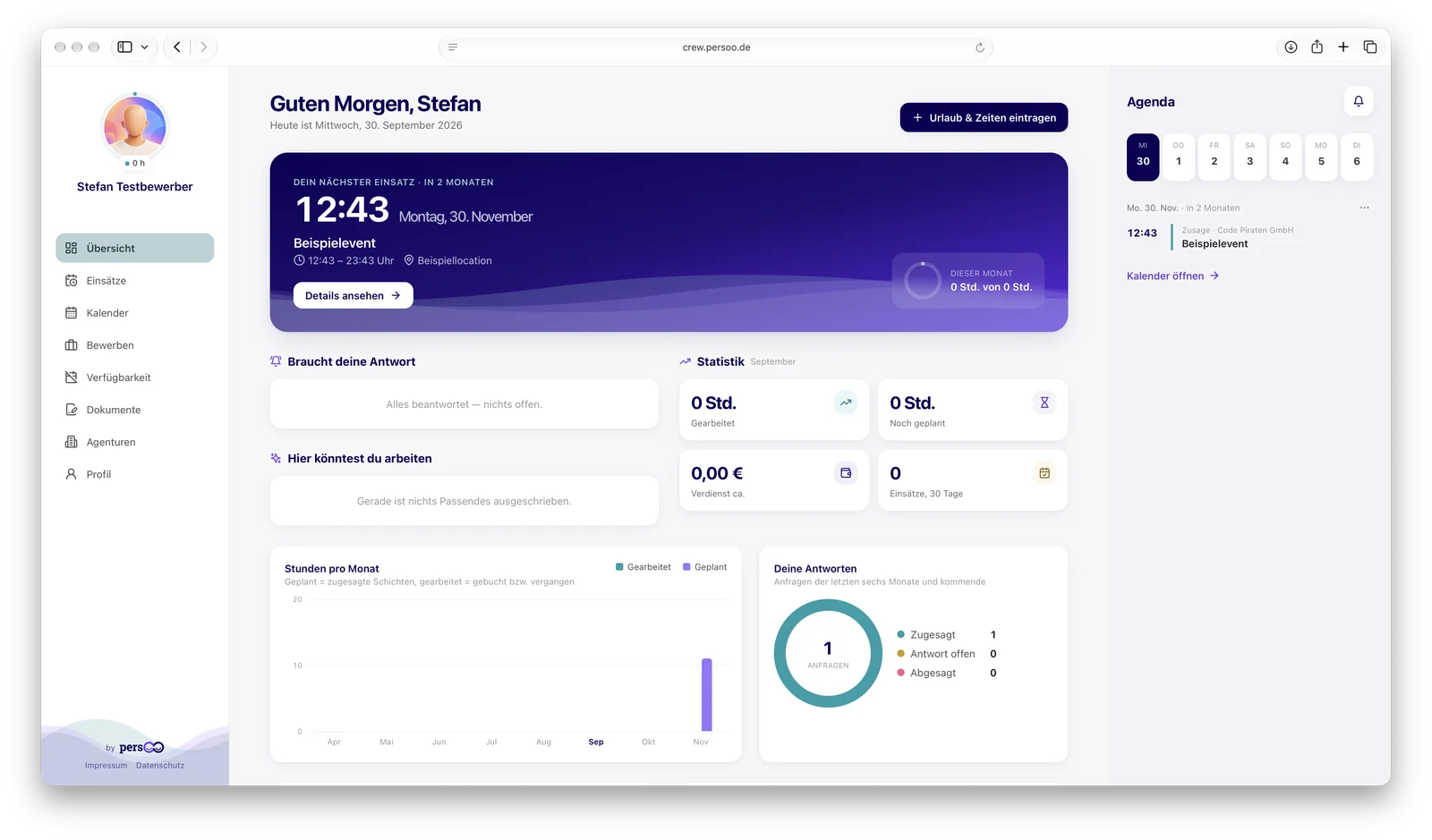
Screenshots with test data (German interface) · click to enlarge
Post your demand instead of chasing people
Instead of asking everyone individually, you post the open slots. Whoever fits and has time applies themselves. All you have to do is confirm — and decide who fits best.
Applications are free · only the confirmed slot is charged · this is also how you find new staff: persoo Recruiting →
How it works
Four steps — and your staff are in the loop without you chasing anyone by phone.
Set up days, positions such as Entrance, Bar or Set-up, and shifts with the number of slots needed — or start from a template. You can duplicate recurring days to up to 60 dates at once.
Post the shift — suitable staff apply themselves and you choose. Or invite people directly: persoo shows who fits and has time, or auto-assigns at the push of a button.
Your staff get the invitation by email and accept or decline, with a reason if you like. persoo sends automatic reminders before the assignment, and changes to the event are passed on.
Your staff clock in and out via QR code, NFC or button — or your team records actual times, breaks and no-shows. Afterwards you export timesheets and payroll sheets.
Features
Easy to use — and still powerful enough for large events with many days and shifts.
Events with days, positions, shifts and slots in one overview, with the fill level per shift. You sort events into folders, and the focus filter hides whatever doesn’t matter right now.
Copy a finished day to up to 60 more dates, duplicate entire events or save them as templates — for trade fairs, festivals and weekly planning in hospitality.
persoo suggests who fits a slot: based on skills, tags and your rating, taking absences and overlaps into account. Anyone who can’t make it is listed with the reason.
Post open shifts and your staff apply — you decide. For new staff there are public application pages with team voting and transfer to the pool.
More on Recruiting →Master data, custom and mandatory fields, skills and tags, ratings (Top, OK, Poor — visible only to you). Your staff maintain their own details, and you can add to them.
Holidays and absences, preferred and blocked times feed into the suggestions. A monthly hours limit per person warns you in good time when things get tight.
Actual times, breaks and no-shows per shift. Staff clock in via QR code or NFC at the entrance, via button or via a scan by your team — with approval if you like.
More on clocking in and out →Staff plan as PDF and Excel, timesheets as PDF or CSV, payroll sheets per person with their hourly rate — individually or bundled as a ZIP.
Share the plan with your client or venue via a link — optionally with a password and a choice of how names are shown. The link expires automatically after the event.
Right on the planning board: tasks for you or the team and a chat per event — so agreements don’t get lost across five channels.
Addresses, billing details, rating and image maintained centrally. Your staff see the public details on their assignment; internal notes stay within the team.
Contracts and briefings as PDF templates, with fields placed freely. Assign via filters, collect signatures, download in bulk.

Draft & silent mode
While an event is in draft, you move and swap people at your own pace — invitations, job postings and change emails are held back. You can also switch a running event to silent mode. Once the plan is final, you activate it — with or without a message to your staff. Your staff get one message instead of ten.
Staffing
Set what a shift needs — say “Bar, tapping beer, Saturday” — and persoo shows you the right staff. You assign directly; your staff just have to confirm.
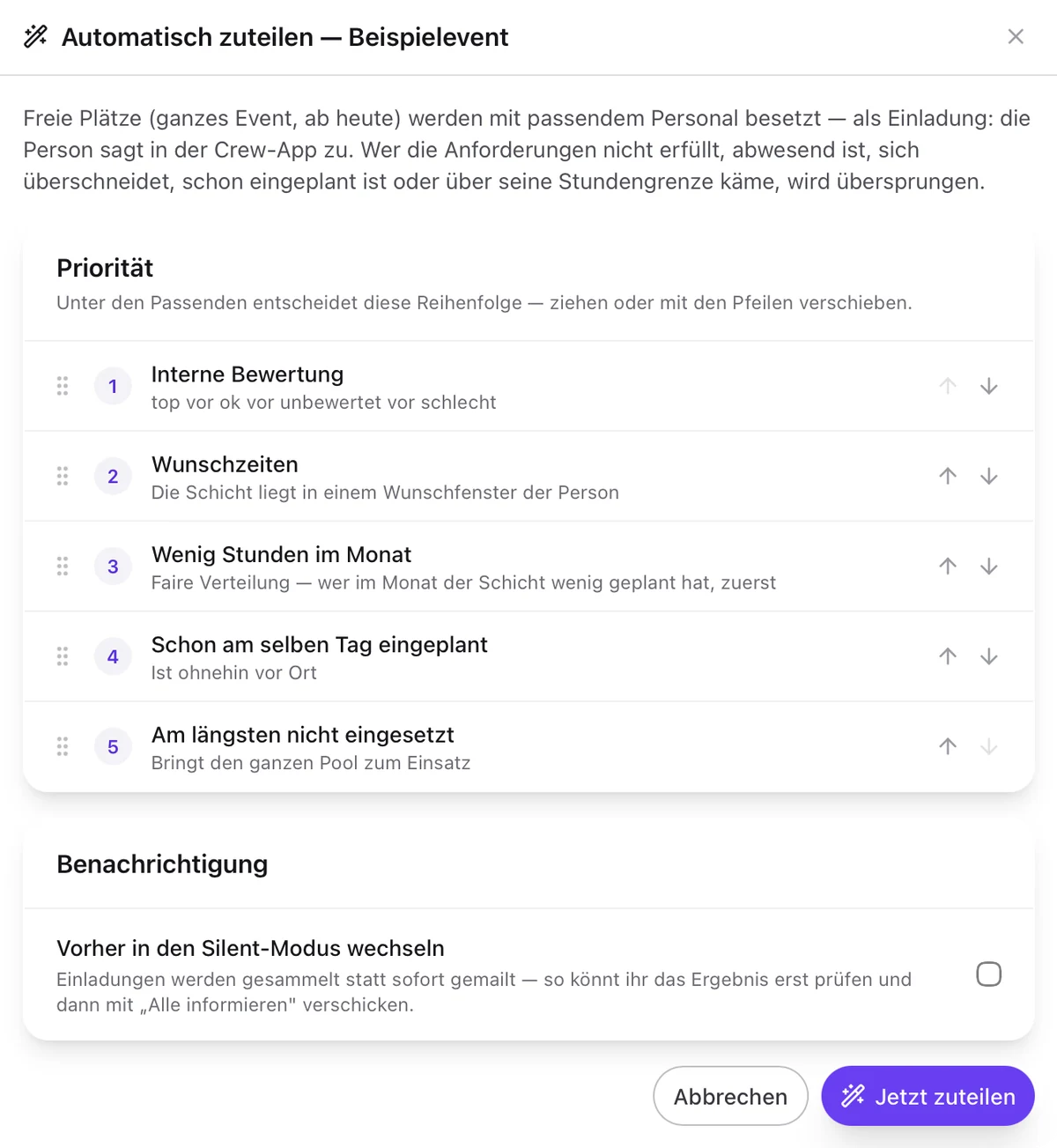
New · Auto-assign
Instead of filling each slot one by one, you let persoo fill an entire event, a day, a position or a single shift. Only people who really fit are invited — and your staff accept themselves as usual.
New · Check-in and check-out
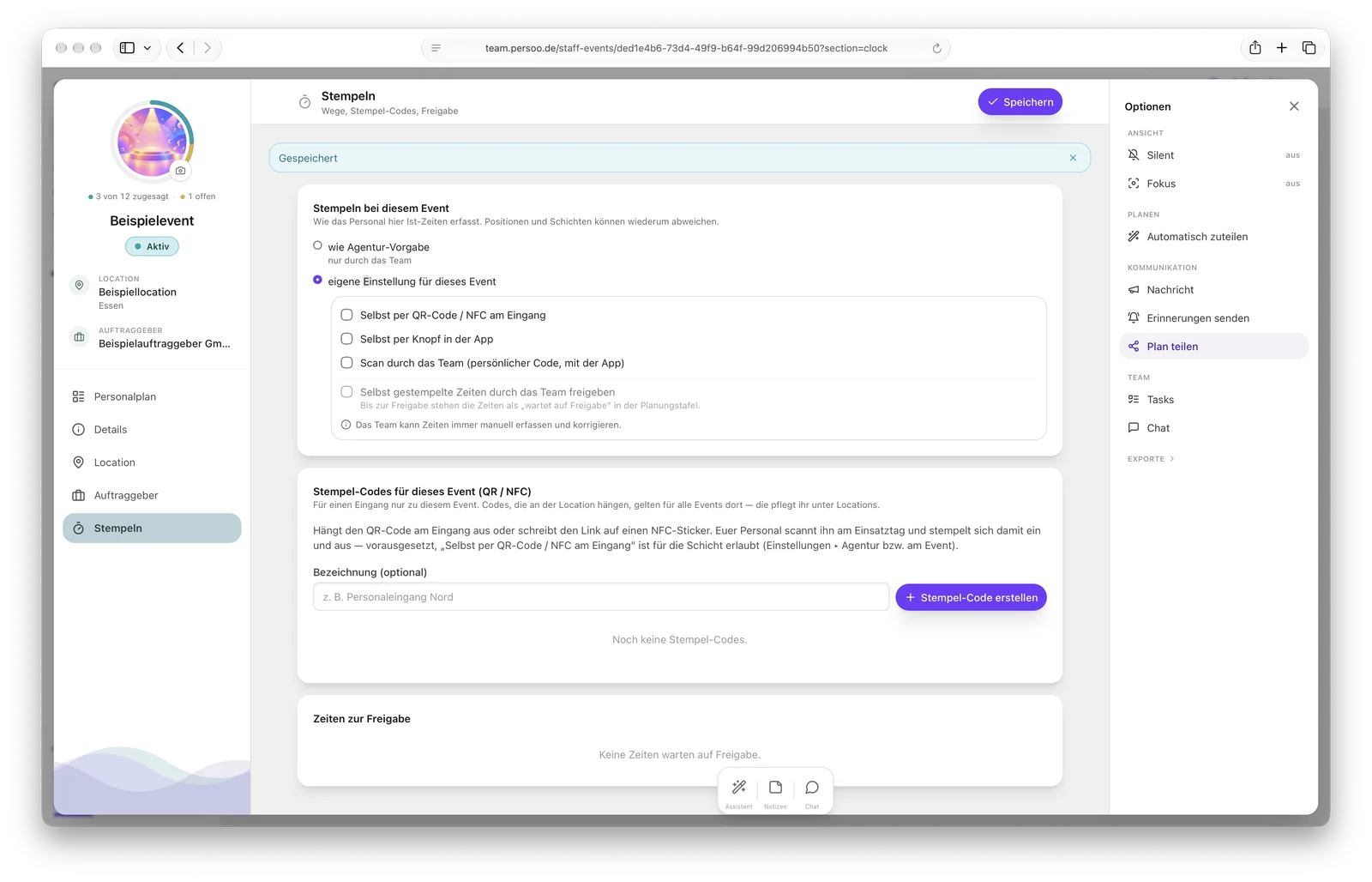
No more paper timesheets. Your staff check themselves in and out — or your staff supervisors take care of it on site. You decide per event what applies.
Your staff check themselves in
persoo finds today’s shift by itself. If you like, your team approves the times first.
Or your staff supervisors
Full control at the entrance — and the times go straight into timesheets and payroll sheets.
Check-in and check-out at the event in team.persoo.de (test data, German interface)
For your staff
Your staff use persoo Crew for free in the browser — with their own dashboard, calendar and all agencies in one place.
No password to forget: your staff log in via a sign-in link that persoo sends by email.
Accept invitations or decline them with a reason, apply for open shifts and keep track of all their own assignments with times and locations.
All assignments as a calendar subscription for iPhone, Android or Outlook — across all agencies, with a reminder three hours before.
Your staff enter their contact details, qualifications, absences and documents such as their trade licence themselves. You always see the latest version.
Contracts and briefings as PDF templates with fields — your staff fill them in and sign directly on their phone.
Scan the code at the entrance or press a button — persoo finds today’s shift by itself. You decide which methods are allowed and approve times if you like.
One app, two areas: in the Team area you see declines immediately and get replacements suggested. In the Crew area invitations arrive on the phone — accept with one tap, check in and out on site. The Crew area is in the App Store and on Google Play; the Team area is in the works.
Who is it for?
Wherever you plan with a pool of temporary, freelance or volunteer staff.
Many events, many shifts, one staff pool: with persoo, coordination takes minutes instead of days.
For agencies →Bar, café, club or catering: set up a week, duplicate, adjust — holidays and preferred times are already taken into account.
For caterers →Several days, set-up and tear-down, thousands of guests: the plan holds even when it rains — and you see declines immediately.
For festivals →Hosts, stand staff, technicians and speaker slots — duplicated day by day and properly staffed.
For trade fairs →Coordinate volunteers: who is at the food counter when, who is on the till? Helpers apply for open shifts themselves.
For clubs →Assignments at many locations, changing teams, proof of work and timesheets for billing the client.
For promotion →A rota app plans fixed weeks for fixed employees. Events work differently: different days, venues, positions and people every time. That’s why persoo plans per assignment — and your pool of temporary staff and freelancers accepts shifts themselves.
Data protection & security
Planning staff means processing sensitive data. persoo is built for that.
Sensitive data such as social security and tax numbers are stored encrypted. In planning you only see whether they have been provided.
Secure your access with an authenticator app and backup codes. Team and staff log in via separate interfaces.
You conclude the data processing agreement directly in persoo (view sample). Retention periods, GDPR data access requests and template legal texts for consents are built in.
Exports and access to staff data are logged, and uploaded files are scanned for malware.
Pricing
No base fee, no subscription with volume limits. Every confirmed slot is billed — that is, every confirmed place in a shift.
Per confirmed slot
€0.25
per confirmed place in a shift
Your first 50 confirmed slots are free — once, for trying it out.
Declined within 24 hours of accepting? Not charged. Reassigning costs nothing extra.
Your team
2 included
team members for planning
Each additional member €3.50 per month. Your staff don’t count.
Always free
€0
for staff, invitations, applications
A large staff pool costs nothing. Neither do declines, job postings or the Crew interface.
All prices net, plus 19% VAT · monthly invoice from €10 net · Example: 20 people × 2 shifts × 3 days = 120 confirmed slots = €30 net
FAQ
There is no base fee. Your agency’s first 50 confirmed slots are free; after that you pay €0.25 net per confirmed slot – that is, per person and shift your staff confirm. Two team members are included, each additional one costs €3.50 net per month. Invitations, declines, applications and the size of your staff pool cost nothing. All prices
A confirmed slot is a confirmed place in a shift. Someone working one shift on each of three days counts as three confirmed slots. If a slot is merely reassigned, no second fee is charged. If someone declines within 24 hours of accepting, the slot is not charged.
Yes. You post a shift with a single switch. Suitable staff – based on the skills and tags you set – see it in persoo Crew, get an email and apply with one click. You see all applications with rating and monthly hours and accept whoever fits best. The person confirms once more, and the slot is filled.
However you like: your staff clock in and out via QR code or NFC sticker at the entrance, via a button in persoo Crew – or your team scans their personal code. You set the methods for the agency and can configure them differently per event, position and shift. If you want, your team approves self-recorded times first. Corrections and manual entries are always possible. More on clocking in and out
Yes. Auto-assign fills open slots of an entire event, a day, a position or a single shift with suitable staff. It takes requirements, absences, overlaps and monthly hours limits into account; among the suitable candidates, your priority decides, such as rating, preferred times or fair distribution. Staff are invited and accept themselves.
Your staff log in without a password via a sign-in link sent by email and accept or decline there. persoo is free for staff.
Yes. The persoo app for your staff is available for iPhone in the App Store and for Android on Google Play. The planning area is coming to the same app. Planning is done in the browser – on your computer and on your smartphone. More about the app
Sensitive details such as social security or tax numbers are stored encrypted. Login can be secured with a second factor, the data processing agreement is concluded directly in the product (sample), and GDPR retention periods and data access requests are built in.
Create your account, set up your first event and invite your staff. Costs only arise with the first confirmed slot.